
Every capability, up close
Nine capabilities. One shared record.
Each of these can be switched on or off for your agency, so your team only sees what it uses. They share one journey, one place for every conversation and one audit trail, so switching one on never creates a second place to look.
What your team sees
00 — ENQUIRIES & APPLICATIONS
The fastest agency gets the surrogate.
Intended parents shop around. Surrogates apply to several agencies at once and go with whoever answers. In Carme every enquiry can be given an owner, and if one sits untouched for five days, its owner gets a reminder. Your application form carries your name, logo and colours, and every submission lands straight in your pipeline.
- Parent enquiries and surrogate applications in one pipeline, each with an owner and a status, from first enquiry to signed contract
- A screening checklist for every surrogate, each item marked passed, failed or waived — on her record, not in somebody’s head
- When parents sign, their record and journey are created from the enquiry — nothing retyped. Set a default journey template and the journey starts by itself
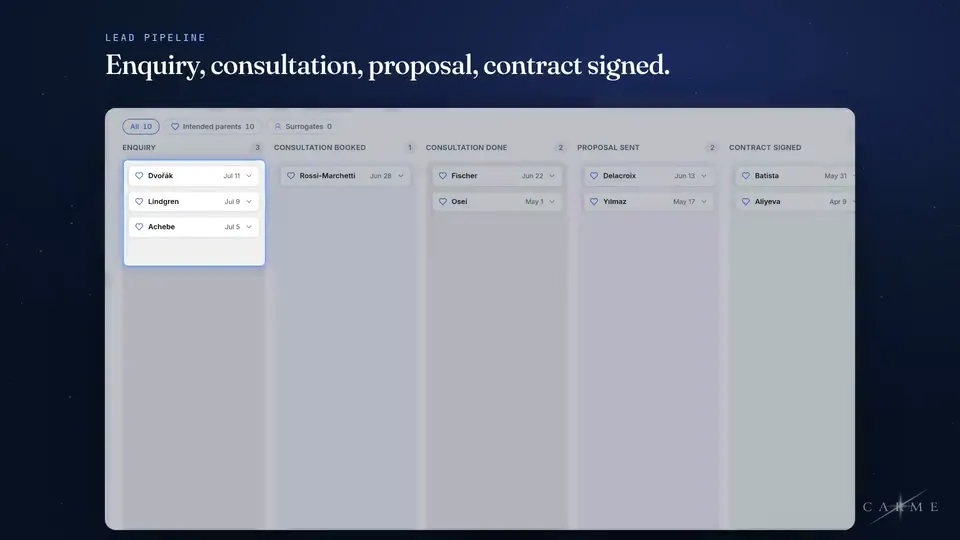
Every enquiry has an owner and a next action.
01 — JOURNEY TRACKING
Everyone can see where everyone is.
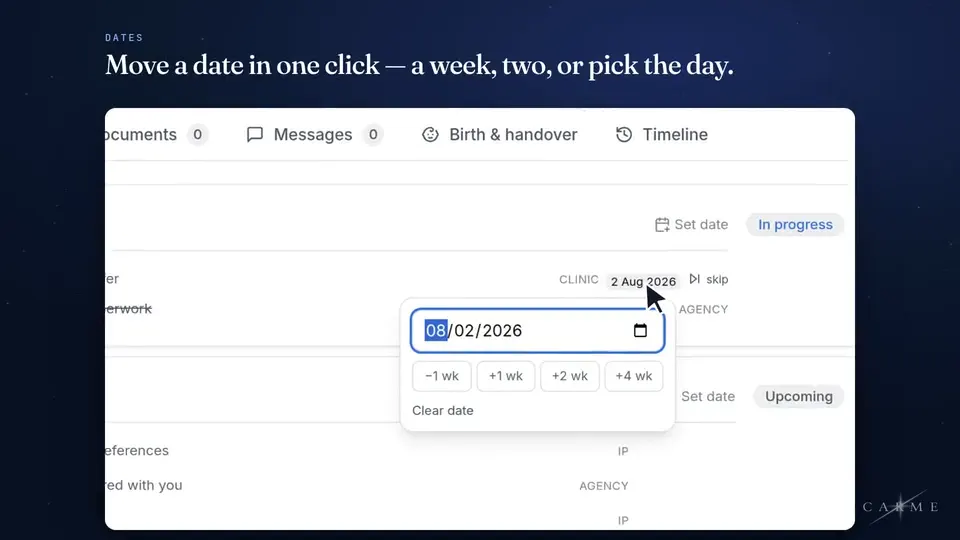
Build the journey from your own stages, from enquiry to handover. Behind the scenes each stage maps to one of twelve standard phases, so reporting still lines up however you name and order them.
- Every step says whose move it is — your team, the parents, the surrogate, the clinic or the attorney
- Journeys running behind their usual pace are highlighted on the journey map (Constellation) the next morning
- Your own stage names and timings, mapped to one standard set of phases
02 — SURROGATE MATCHING
From proposal to journey, without re-typing.
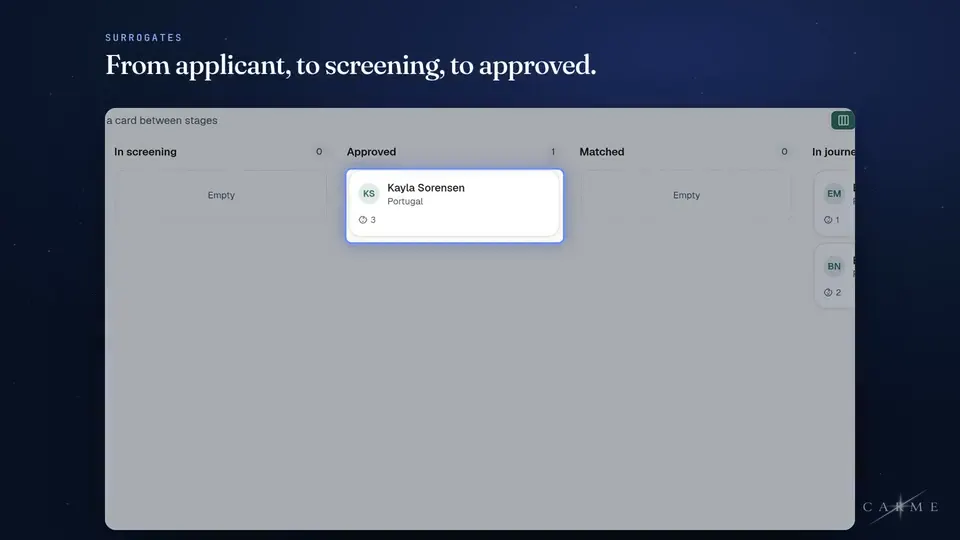
Propose a surrogate to a family. She answers in her portal and, if you choose, the parents accept or decline in theirs. Once both sides say yes, you confirm the match and she joins the family’s journey, with the proposal history attached. Six months later you can still see how the decision was made.
- Propose a match, present it, and record each side’s yes or no
- Confirming a match adds her to the family’s journey — nothing entered twice
- Declined proposals stay on the record, with the reason when one was given
The Adeyemis
Daniela R.
Both sides answer in their own portal.
03 — REPORTING & ACTIVITY
Where the time actually went.
Carme learns how long each phase takes at your agency: your own figure takes over after five of your journeys finish a phase. Until then it uses typical figures and says so. The phase that eats a month becomes a number instead of a suspicion. Every change to a journey is logged: who made it, when, and what changed.
- Typical days per phase at your agency, shown after five of your journeys finish that phase
- Who is carrying what, so load is visible before someone drowns
- An append-only audit trail that nobody can edit
What the family sees
04 — PARENT AND SURROGATE PORTALS
Nobody has to ask where things stand.
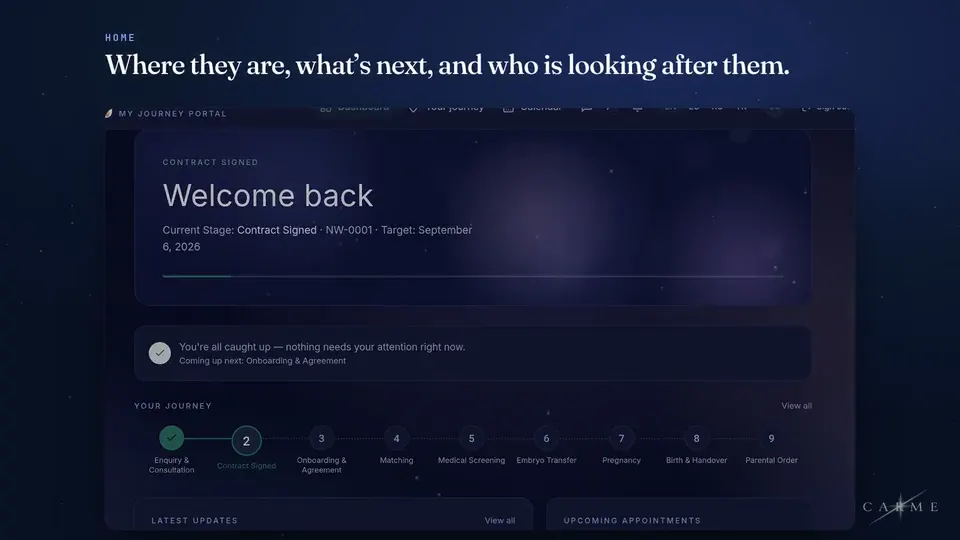
Parents see where they are, what happens next and what they need to do, in English, Spanish, Russian or Turkish, under your name. Your surrogate gets a portal of her own — her appointments, her payments, her documents, her own thread with you — and it stays open after handover.
- Your name, logo and colours on the portals and on every email, with a small “Powered by Carme” line at the foot. Connect your own web address whenever you like
- Portal screens written in four languages, and each person picks their own
- Her thread is hers: the parents never see it, and it does not close when the journey does
Fase 6 de 12 · Emparejamiento
PRÓXIMA CITA
Transferencia de embrión
14 sept · 09:30 Bogotá
05 — CENTRALISED COMMUNICATION
Every message on the journey, readable in their language.
Conversations live on the journey, not in one coordinator's inbox. Anyone can read a message in their own language with one click, or the agency can turn on automatic translation for every message. Translation is AI-powered. When someone goes on leave, the thread stays with the family.
- Translated in both directions, with the original one tap away
- Every conversation sits on the journey, not in someone’s personal inbox
- When a colleague takes over, they read the journey instead of asking you
¿Cuándo es la próxima cita?
When is the next appointment?
AUTO-TRANSLATED · ES
On the journey — nothing lost to a private inbox.
06 — APPOINTMENTS & TRAVEL
The right time, in the right timezone.
Scans, transfers and consulate visits sit on the journey with everything else, and so does the family’s trip. Each person reads them in their own timezone.
- The clinic's local time and the reader's, side by side whenever they differ
- The parents propose travel dates; you confirm them and plan the in-country visits on the same trip
- Email reminders a day and an hour before, sent to the parents and surrogate for every appointment you share with them
14
Sep
Embryo transfer
Bogotá clinic · 07:30 your time
03
Nov
20-week scan
Bogotá clinic · 08:00 your time
19
Dec
Consulate appointment
US Embassy · 05:15 your time
The paperwork and the money
07 — DOCUMENTS & E-SIGNATURE
See what is about to expire.
Requested, uploaded, under review, approved or sent back — every document has a status and a set audience, and contracts track who has signed. Documents expiring in the next 30 days are marked amber in the documents list, because a lapsed clearance costs a cycle.
- Signature built in — no third tool, no downloading and re-uploading
- Expiry dates on documents, amber from 30 days out and red once lapsed
- Shared with the agency only, the parents, the surrogate, or both — and no one else
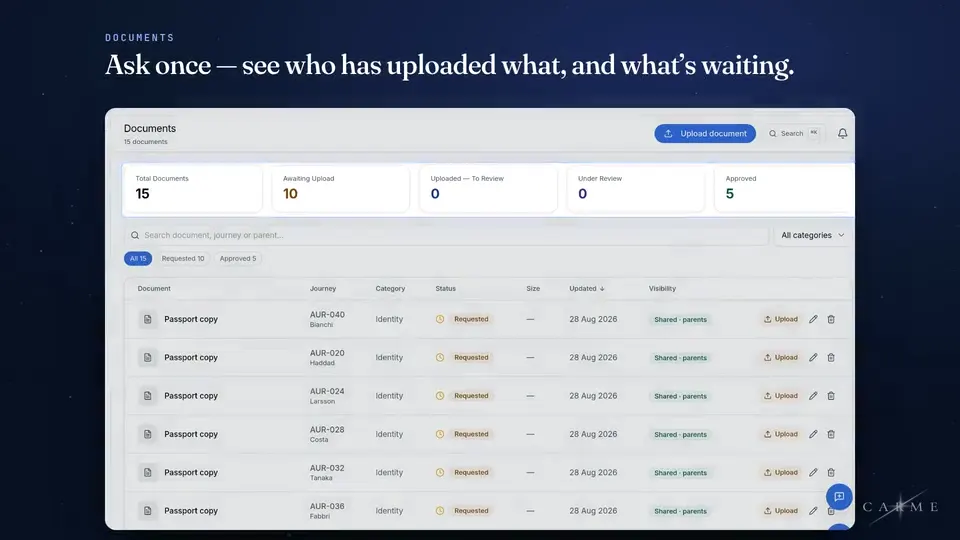
Visible to exactly the people who should see it.
08 — PAYMENTS TRACKER
What's due, what landed, what they queried.
Milestone schedules sit on the journey. Link a payment to a step and the step waits until it is paid. Money is tracked here and never processed here — we are not in the flow of your clients’ funds, and we do not want to be.
- Fee schedules per journey, with what has landed marked off
- A family's query recorded against the milestone it concerns
- We track escrow, we never hold money: no card payments, no transfers, no custody of anyone's funds
The honest part
What this deliberately does not do.
A shorter list than the one above, and a more useful one. Anything we cannot do properly, we would rather you heard from us than discovered in month three.
It does not hold anyone's money
Payments and escrow balances are tracked against milestones. The money itself, transfers and card handling stay with your bank, your escrow agent and the people already licensed to do them.
It does not give medical or legal advice
It records what your clinicians and attorneys decide and tells the right people. It never advises.
It never contacts your families for its own purposes
Your name, logo and colours are on the portals and on every email, with a small “Powered by Carme” line at the foot. Connect your own web address whenever you like. We never contact your families ourselves: every email they get goes out in your name.
It does not invent a number it cannot source
Every figure in the product traces to something that happened in your workspace. Where we can only model, we say so.
Start simple. Switch on the rest when you are ready.
A workspace you create by signing up opens in Simple Mode: enquiries, intended parents, journeys, documents, messages and the journey map (Constellation), so your team is hands-on fast without being overwhelmed. Switch to Full Mode in Settings whenever you like to unlock the rest — surrogates, matching, appointments, payments, import, template editing and more — and switch off any module you do not use. Same price either way, and nothing has to migrate.